Flight logbooks

Quick Release keeps a logbook for every balloon and every pilot. Each completed flight is turned into a log entry automatically, so the logbook builds itself as you fly.

Feature location

Open Logbooks from the main menu. You’ll find two lists — one for balloon logbooks and one for pilot logbooks — each shown as an expandable panel. The panel header shows the name and a running total at a glance:

Logbook panel header showing total flights and hours

Expand a panel to see the full logbook:
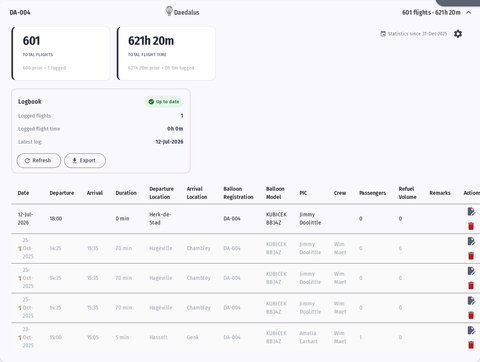
Expanded balloon logbook with totals, status card and log list

Reading the totals

At the top of every logbook, two tiles summarise the whole flying history:

  • Total flights — the complete number of flights.
  • Total flight time — the complete flight time, in hours and minutes.

Each tile shows how the total is composed: what was carried over from paper (prior) plus what Quick Release has recorded (logged). The same combined totals appear on the panel header, so you can read them without even opening the logbook.

The Logbook card

Below the totals, the Logbook card shows the state of your recorded entries and whether the logbook has caught up with the system:

  • A green Up to date badge means every flight the system knows about is already in the logbook.
  • An amber badge (for example 3 to add) means the system has found completed flights that aren’t in the logbook yet. A short note lists how many and their total time, and an Add button records them in one click.

From this card you can also:

  • Refresh — re-check the system for newly completed flights.
  • Export — download the logbook as a PDF and CSV, including a summary line of pre-digital, logged, and total flight time.

The log list

The full list below the card shows every flight, newest first. Each row can be opened to view or edit the flight, and stored entries can be removed.

Prerequisites

  • A balloon logbook is created per balloon; a pilot logbook per pilot. A flight becomes a log entry once it is completed, and it has both a pilot (with an e-mail) and a balloon (with a call sign).
  • Setting a start date and pre-digital totals requires logbook edit rights.